
The whole week on one screen. When a job moves, drag it.
The only scheduling solution built for the complexity of industrial field service.

crewOS field service management software
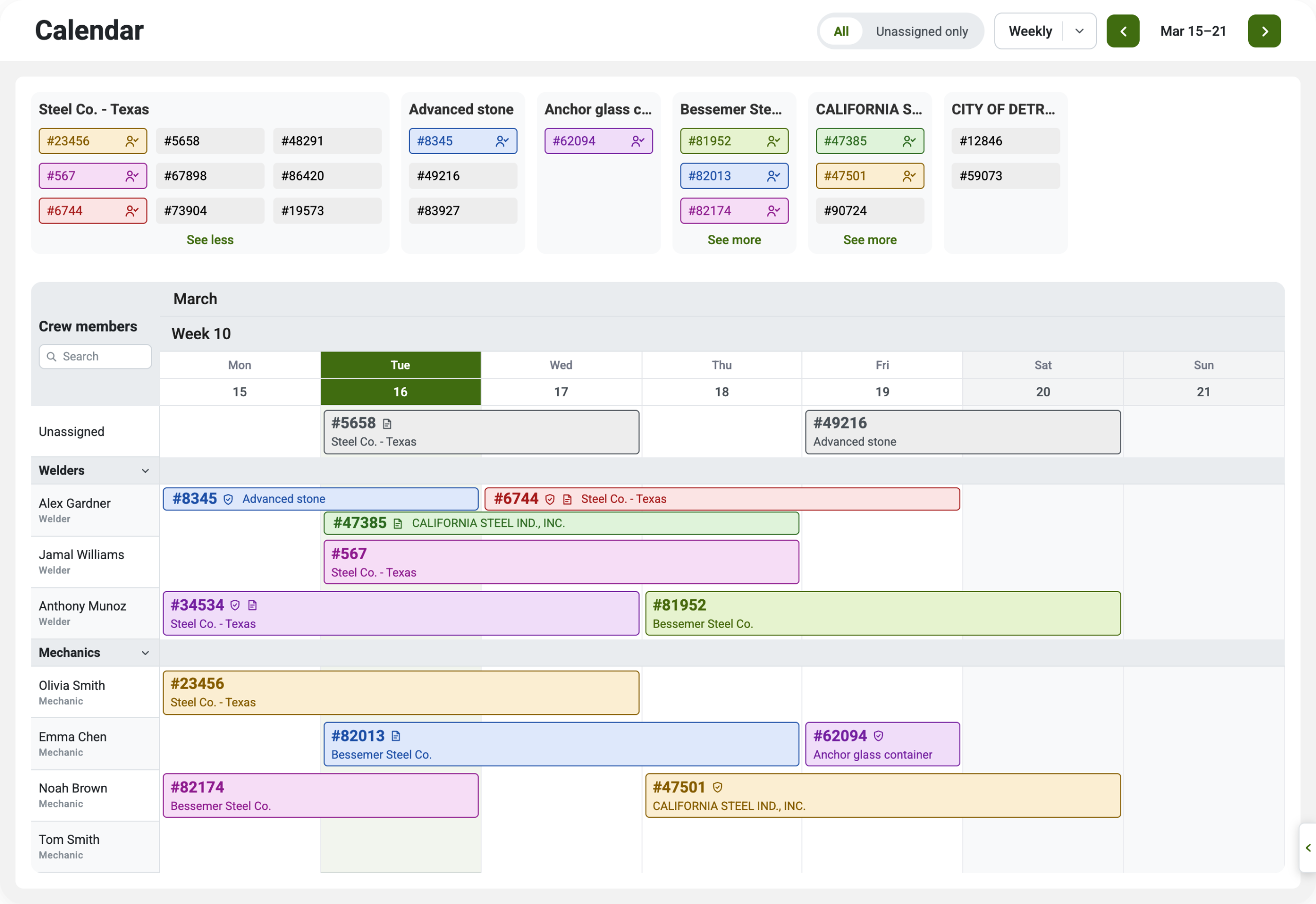
The whole week on one screen
The new web scheduling calendar puts every crew member in a row and every job in a bar across the days it runs. Multi-day work shows as one bar across the days it spans, the way a shutdown actually runs.
Seamless scheduling across teams, jobs, and locations.
crewOS integrates directly with your existing ERP, keeping scheduling, job assignments, and resource management connected in one system.
Custom scheduling rules to fit your business.
Set business-specific scheduling rules to prevent overbooking, manage shift rotations, and automatically notify teams of job assignments and changes.
Real-time visibility into workforce and resource availability.
See who’s available, where crews are deployed, and what equipment is assigned—all in real-time—so you can schedule with confidence and reduce delays.

Open the work order without leaving the week
Click any job on the calendar and the work order slides open beside the week. You don’t leave the schedule to work on it. Set the date range, change the job type, move the status from Ready to Schedule, and confirm the service location, with the customer and their location shown alongside. Pick a card color so the calendar reads the way your whiteboard used to. The job description is one tab over, and you can update it as fast as the job changes.
Benefits of using crewOS for scheduling
What if your industrial field service scheduling system could eliminate manual work, prevent conflicts, and give you real-time visibility into your workforce—without the headaches?
Save time on scheduling
Eliminate manual data entry
Reduce back-and-forth communication
Improve real-time data visibility
Ensure accountability
Optimize resource allocation
Maintain high technician utilization
Reduce scheduling conflict stress
“This allows us to scale… To me, spreadsheets don’t scale. That’s just more labor.”
Tom Anderson, Field Service, Allied Power Group
Frequently asked questions
Can I customize what fields are shown on the calendar?
Yes! crewOS offers a flexible set of options to display in your schedule. You can choose to show all the important details about your jobs and crews to ensure everyone stays on the same page.
Can I have a separate calendar for different locations or divisions in my business?
Absolutely! With our service locations feature, you can associate teams and work orders with specific locations, ensuring you only see the relevant information for each site.
Can I track off-time for my field team?
Yes! Our scheduling feature allows you to block time for crew members to track vacations, PTO, and company holidays.
Can I track equipment or assets related to our jobs?
Yes, you can view a comprehensive set of data points related to work orders and crews in the calendar view. This helps ensure that equipment, trucks, cranes, and other assets are fully utilized without being overbooked.
It’s time to get started
We’ll help you be the hero every field service operation needs.
