
The inspection report your customer trusts. The proof your crew delivered.
Any company can say they did a thorough inspection. crewOS is how you prove what your crew found, and what they did about it. Industrial-strength inspection workflows on a mobile app that makes them field-simple. Structured findings tied to the asset. A report your customer sees the moment the tech signs off.
Everything between the walk-up and the paid invoice.
One system carries the inspection from the field to the customer. No retyping, no assembly, no gaps.
Industrial-Strength Inspections
Rated for the most complex inspection workflows in the industrial world, component by component, question by question, on a mobile app that makes them effortless in the field. Works offline.
Replaces: generic forms that flatten your process, and paper that slows it down.
Built-In Guidance
OSHA regs, wiring diagrams, and your team’s own know-how attached to the exact question where they’re needed.
Replaces: tribal knowledge that lives in one tech’s head.
Answer-Level History
Every answer shows the previous answers for that same question on that same asset. Consistency, built in.
Replaces: standalone reports with no memory.
Action Items
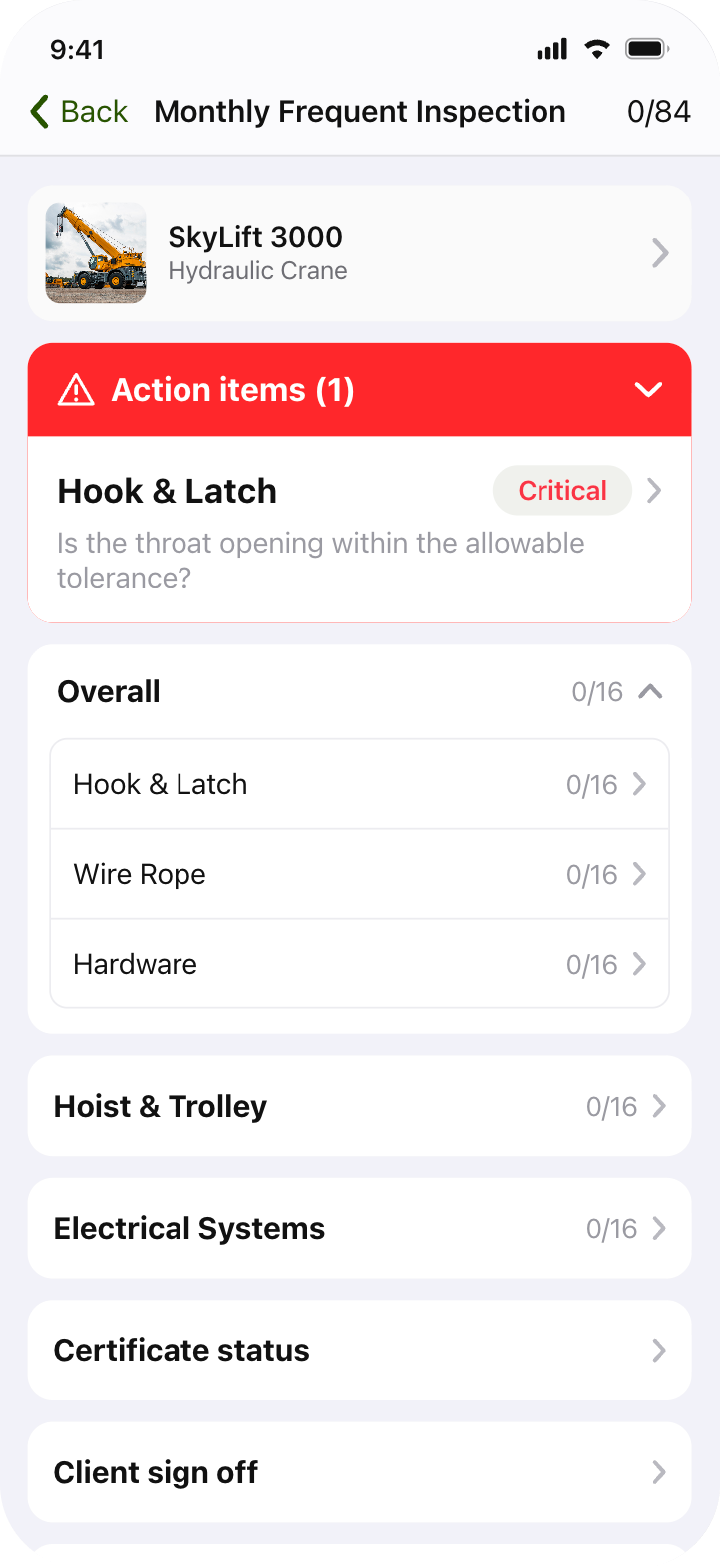
Flag any finding for follow-up, quote, or repair, right from the inspection. Nothing falls through.
Replaces: findings that die in a filed PDF.
World-Class Reports
The best inspection report in the industry, generated the moment your tech signs off. Branded, photo-rich, and built to knock your customer’s socks off.
Replaces: 60-page reports nobody reads.
Disconnected tools
- Handwritten service reports, illegible at billing time
- InspectAll, GoFormz, SafetyCulture, generic forms.
- Time entered by hand in 3 places every day
- Weeks to process reports and invoice jobs
- No way to prove the work was actually done
1 platform
- Structured digital reports with embedded photos and asset data
- Inspections, scheduling, payroll, invoicing and dispatch in one place
- Time entered once, flows everywhere automatically
- Next-day repair quotes and invoices on jobs
- Reports competitors simply can’t match
Put our inspection report next to anyone’s in the industry.
The report is where your customer decides what your work was worth. So we built the best one in the business. And it builds itself.
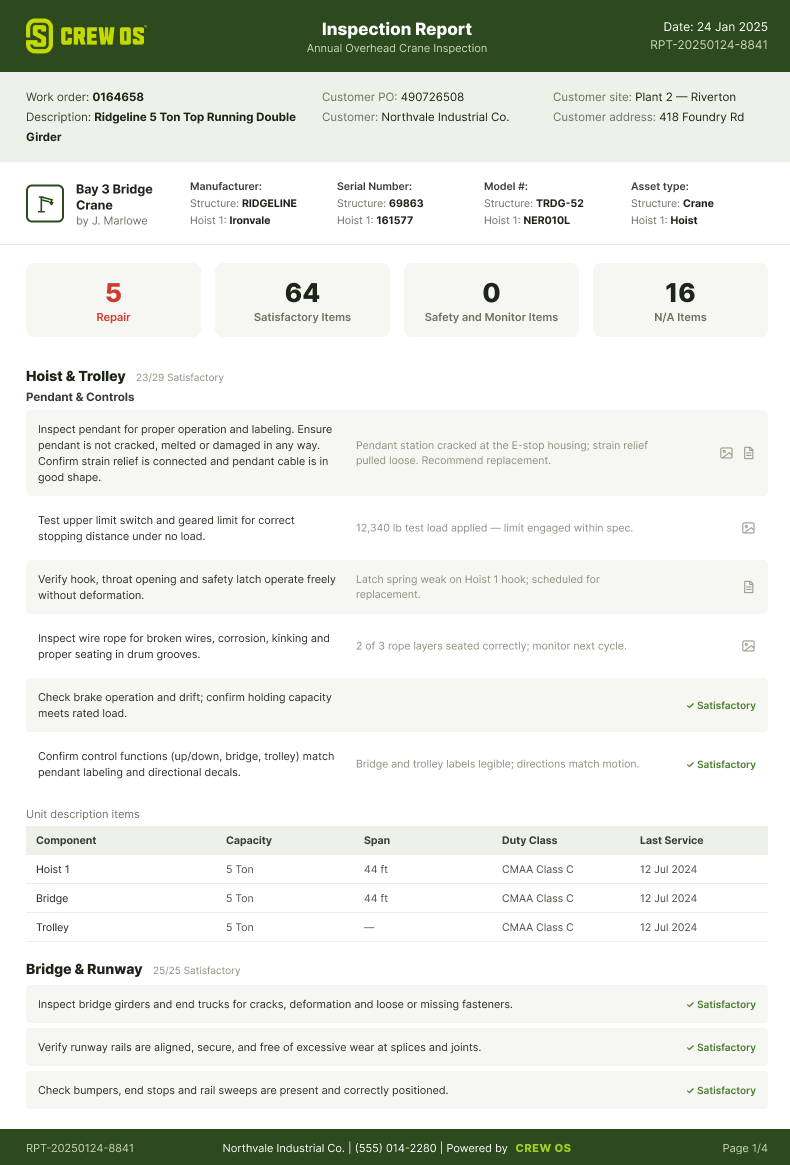
crewOS auto-generates a structured, branded PDF at the moment the inspection is signed off in the field. No retyping. No assembling reports the next morning. Your customer gets documented proof before your crew gets back to the yard.
- Asset summary page: make, model, serial numbers, and key specs, auto-populated from your asset records in crewOS
- Large embedded photos: attached to the exact finding, not thumbnails or a folder link
- Clear deficiency documentation: every finding with severity, location, and recommended next step
- Full history behind every page: findings stack on the asset record, so this report is one chapter in a story your customer can trust
- Generated automatically: the moment the tech signs off in the app
Industrial-strength inspections. Field-simple.
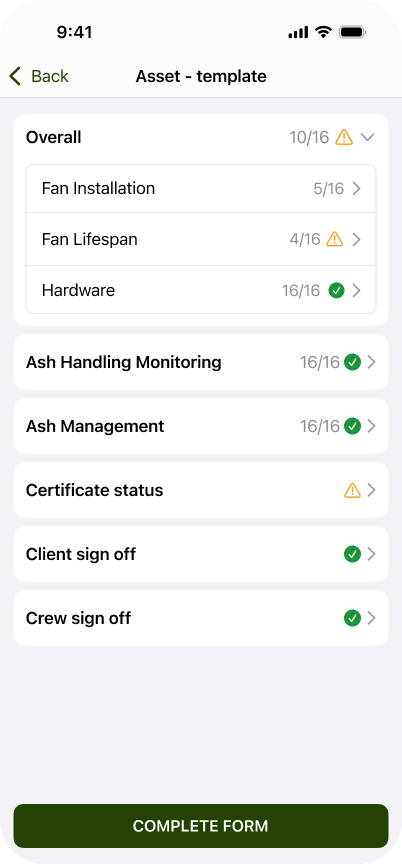
Real inspections aren’t checklists. They’re deep, component-by-component workflows with conditional logic, measurements, severity ratings, and regulatory requirements that vary by equipment type. crewOS is rated for that load. Built for the industrial world, not adapted to it, and it doesn’t flatten your process into a generic form.
Then the mobile app does the opposite job: it makes all that strength effortless in the field. Your techs move through the full workflow question by question, with mandatory fields and digital sign-off enforced before the job can close. Strong enough for your most demanding inspection. Simple enough that it gets done right, every time.
Works offline in areas with no signal. Photos, notes, and completed inspections sync automatically when connection returns.
- Matches your workflow: your components, your questions, your standards, not a generic template
- Works offline, so dead zones aren’t a problem
- Photo capture inline with every question
- GPS-verified sign-in and sign-off
- Mandatory fields enforced, no skipping steps
- Digital signatures from tech and customer
Your best tech’s brain, attached to every question.
Every business runs on knowledge that never got written down. The reg that applies to this component. The wiring diagram for this model. The thing your senior tech knows to check because he’s seen this unit fail before. When that knowledge lives in someone’s head, it walks out the door with them.
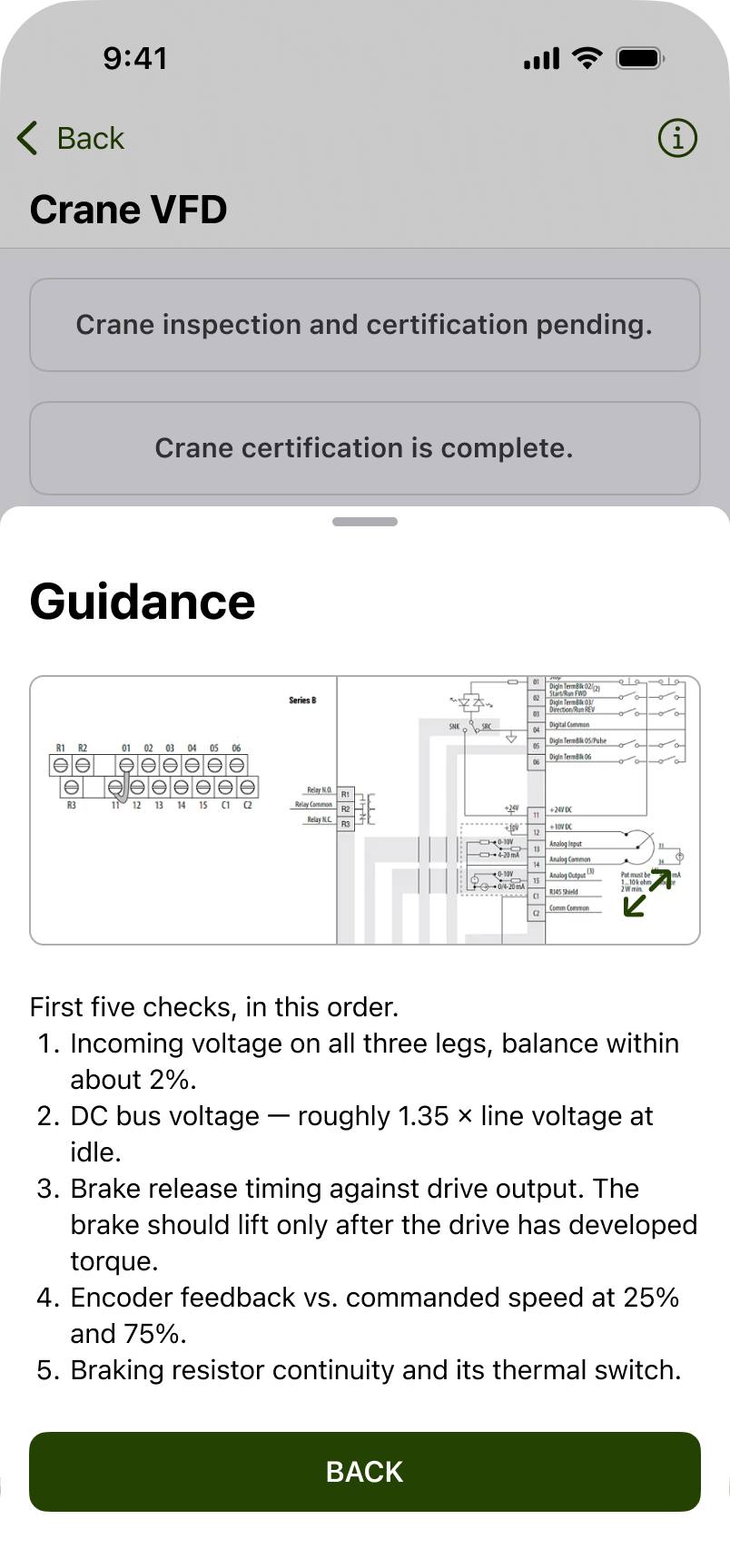
crewOS Guidance lets you attach that knowledge to the exact question where it’s needed. Your tech opens the question and the reference is right there. No calling the office, no digging through a binder in the truck.
- OSHA and regulatory references: the applicable reg attached to the question it governs
- Wiring diagrams, schematics, and manuals: pulled up at the component, not hunted down in SharePoint
- Your team’s own knowledge: the tips, warnings, and “check this first” notes your veterans carry in their heads, captured once and delivered to every tech on every inspection
- Consistency across experience levels: a six-month tech inspects with the context of a twenty-year veteran
The deep knowledge your team owns is your real competitive edge. Guidance is how you systemize it, so it compounds instead of retiring.
Every answer remembers the last one.
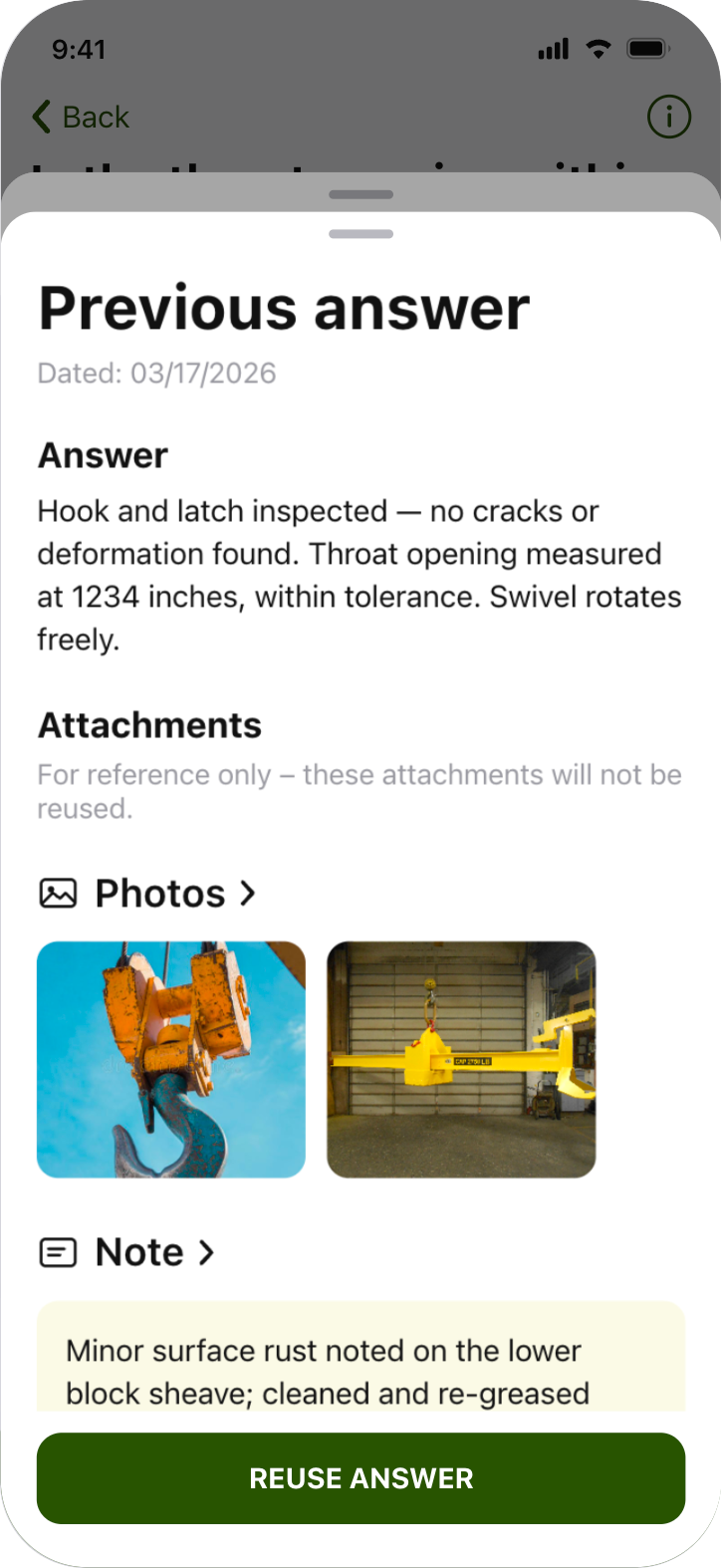
Inside any question on the inspection, your tech can see the detailed history of previous answers for that same question on that same asset. What was the condition rating last quarter? What did the last tech note about this brake? Was this flagged for monitoring?
That does two things no standalone inspection app can.
It keeps your reports consistent. When the tech can see that this component was rated “monitor” on the last two visits, the third rating is made with context, not from scratch. No more one tech flagging a repair and the next tech calling it fine, the inconsistency that makes customers question the whole report.
It tells your customer what to do next. A finding with history behind it isn’t just an observation, it’s a trend. “This has moved from monitor to repair-required over three inspections” is a clear next best action your customer can act on, and a level of documentation your competitors can’t produce.
- In-line history on every answer: previous ratings, notes, and photos for that question on that asset
- Trend visibility at the point of capture, not just in an office report
- A historical record that compounds. Every inspection makes the next one sharper.
Nothing gets found and then forgotten.
Action items are how findings leave the inspection and enter your workflow. When a tech flags something (a deficiency that needs repair, an item to follow up on, a part worth quoting), they mark it as an action item right from the inspection. One place. One motion. No sticky notes, no “remind me when we’re back at the shop.”
From there, every action item is routed: converted into a draft quote with asset data pre-filled, queued for repair, or assigned for follow-up. And when the quote is ready, your customer approves it with one click in the Customer Portal.
Gengroup Crane went from a multi-day paper-based inspection-to-quote process to same-day turnaround. That speed is a competitive edge, and a revenue one.
- Flag any finding as an action item without leaving the inspection
- One click turns an action item into a draft quote with asset data pre-filled
- Queue repairs and follow-ups directly from the field
- One-click customer approval in the Customer Portal, and the job auto-converts
- 50% reduction in admin time at Gengroup Crane after going live
The best inspection report in the industry isn’t built by an inspection app.
A standalone inspection tool starts every job from zero and ends every job at a PDF. crewOS Inspections sits between two things no standalone tool has: your asset records and your customer’s portal.
Asset Management
Every asset, every prior finding, ready before the tech starts.
crewOS Inspections
Structured, branded, auto-generated at sign-off.
Customer Portal
Live to your customer the moment the tech signs off.
Asset Management feeds the inspection.
Before your tech starts the inspection, crewOS already knows the asset. Make, model, serial number, and every prior finding on it. The report auto-populates instead of being retyped, and every new finding stacks onto the asset’s history. Your third inspection on a unit is smarter than your first.
Explore Asset Management →The Customer Portal delivers the proof.
The moment the tech signs off, the report is live in your customer’s branded portal, alongside their full service history and any open quotes. No outbox delay. No “can you resend that?” And when a finding becomes a quote, they approve it right there with one click.
Explore the Customer Portal →Data in from your asset records. Proof out through your customer’s portal. That’s why the report in the middle is the best in the industry, and why a standalone inspection app can’t match it.
“It’s one thing to convince a customer you’re going to do a better job than the previous guy. It’s another thing to show proof that you actually will.”
— Ricci Halbrook, Operations Manager, Morgan Site Services
Read the Morgan story →Inspection-to-quote turnaround, down from a multi-day paper process
Gengroup Crane
Reduction in administrative time after replacing paper inspections
Gengroup Crane
Faster invoicing, 30+ invoices in 30 min vs. 12 per 2-hour session
Morgan Site Services
Read the customer stories
Questions we hear from every operation making the switch.
Can we switch from InspectAll and keep our historical inspection data?
Yes. crewOS migrates your historical inspection and asset data as part of onboarding, and our team does the work. Your asset records, inspection history, and findings come with you, so your first crewOS inspection starts with your full history behind it instead of a blank slate. You don’t lose the years of data you already built.
How long does it take to go live?
Most customers are running live inspections in the field in under 30 days. Our team builds your inspection workflows with you, migrates your data, and trains your crew. You’re not handed an empty tool and a manual.
Does it work offline in areas with no signal?
Yes. The crewOS mobile app works fully offline. Your techs complete inspections, capture photos, and record findings with no signal, and everything syncs automatically when connection returns. Dead zones inside plants and remote sites aren’t a problem.
Does crewOS meet OSHA inspection documentation requirements?
crewOS structures every inspection with time-stamped records, GPS-verified sign-offs, mandatory fields, digital signatures, and findings tied to specific assets and components. When an auditor or customer asks for documentation, you can produce the complete inspection history on any asset in seconds. Regulatory references (OSHA, ASME, CMAA) can be attached directly to the inspection questions they govern through Guidance.
Can we use our own inspection forms and standards?
Yes. crewOS builds your workflows around your components, your questions, and your condition standards. It’s rated for the most complex inspection workflows in the industrial world, so your process doesn’t get flattened into a generic template.
We’re a plant running our own equipment, not a service company. Does crewOS fit?
Both. Service companies use crewOS to inspect customer equipment and turn findings into quotes and repair work. Plants and facilities use it to manage inspections on their own assets and feed maintenance planning. The workflows, history, and reporting work the same way in both worlds.
See what your inspections can prove.
Book a 15-minute demo and we’ll show you the full flow. From the asset record, through the inspection, to the report in your customer’s portal.
